Curb

Curb
License:
Free
Language:
English
Developer:
Developer's website
OS:
Mac OS X
Added:
See detailed info

Softonic review

Cyril Roger

“Trash files from removable media”

by Cyril Roger about Curb

With removable media such as USB keys, because you tend to transfer files rather frequently, you can end up with a lot of unnecessary clutter. Curb helps you clean up all the mess on any removable devices.

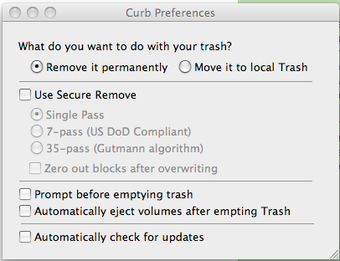
This nifty little application works very easily. Just drag and drop your removable media onto the interface and Curb will take care of removing the trash. A little progress bar will appear, showing you what you are erasing. Curb includes Secure Remove, of which you can select several options: single pass, 7 pass, 35 pass or zero out blocks after overwriting. Generally single pass is enough to safely remove all your trash, however if you are worried about your privacy you should turn to one of the other options.

Curb is really a great trash removal program, not only because of its simplicity but also thanks to the Secure Remove feature. In a sense, it's a shame that it's only built for removable media, as I'm sure it would also come very handy as a normal removal tool.

Curb is a simple, drag and drop trash removal tool for USB, with a good Secure Remove feature.
Pros
  • Secure remove
  • Easy to use
Cons
  • Only works with removable media
Free Download Curb 1.0

Curb is virus free

We have analyzed the latest version of Curb with 30 antivirus engines and it is virus free. See analysis results.

TESTED VIRUS FREE - Softonic GUARANTEED

Developer's description

Curb is designed to facilitate emptying the trash from removable media such as USB Keys.

When files are deleted on removable media, it is stored in a special trash folder on the media. These files take up room, robbing your drive of free space. Ordinarily to remove these files the user must empty their own trash, which includes files you’ve deleted on the local system. This is not always desirable.

With Curb, emptying trash from a USB key becomes as easy as drag and drop. Drop any number of mounted USB keys onto Curb and each one will have the trash removed, all without losing your local trash.

Curb (1) User reviews

  • Essential
  • 10/10
  • bidmead bidmead
    User reviews
    1

    Is this app necessary?

    No USB stick should accumulate deletions. So:

    Plug a USB stick into your Mac, open the Terminal, and delete the .Trashes directory. Replace it with an empty .Trashes file... More

    • Review of Curb - 17 Dec 2010
      This review is liked by 2 of 3
Your avatar
Review
  1. Maximum: 75 characters

  2. See example

Pros and Cons
Rate
  1. What rating would you give Curb?

    You need to fill in all fields

    • Usability:

      Not rated
    • Stability:

      Not rated
    • Installation:

      Not rated
    • Functionality:

      Not rated
    • Appearance:

      Not rated
    • Overall rating:

      Not rated
  2. Don't worry, we won't make your email address public.

You're not allowed to share serial numbers, cracks, etc. or link to pages that contain them. If you do, your user account will be deleted, your IP address logged and legal action will be taken.

Get started - just ask a question!

Write a title for your question.

Alternativesto Curb

  • In English:
    uApp
    uApp

    The total uninstaller for Mac

    Softonic rating:
    • 7/10
    User rating:
    • 9/10
  • Better rating:
    AppCleaner
    AppCleaner

    Fully uninstall applications on Mac

    Softonic rating:
    • 9/10
    User rating:
    • 9/10
Compare with Curb
Download rank: Uninstallers & Cleaners

20 of 50

Softonic rating:
  • Very good
  • 8/10
User rating: (1 rating)
  • Essential
  • 10/10
Your rating:
Your rating
  • 0

Review and rate this program

Blog posts about Curb

More

Top Downloads: Uninstallers & Cleaners

  • United States
  • Global

  1. AppCleaner

    Fully uninstall applications on Mac

  2. CleanMyMac
  3. AppDelete
  4. Magican
  5. CCleaner

Reviews of Curb in other languages